


Introduction
It’s not a surprise that out of all of our core features, the most popular one is the Splunk App for Query. A majority of our customers are users of Splunk, with cost pressures pushing them out of Splunk, and the decentralization-first nature of Query providing an easy offramp. A popular SIEM that these customers often migrate onto – fully, or partially – is Microsoft Sentinel.
The Sentinel ecosystem is one of the most popular modern SIEMs, boasting a powerful query language – Kusto Query Language (KQL) – and many native integrations with the Microsoft M365 Security stack and Azure services such as Azure Logic Apps. From a single place, customers can manage Alerts and Incidents, create detection rules, automate runbooks, and achieve parity with Splunk and Splunk ES from within the Microsoft stack. It’s even more powerful when you have a M365 E5 license and operationalize all of the tools it offers such as Microsoft Defender for Endpoint, Defender for Cloud Apps, Entra ID PIM, Purview, and more.
Query and Microsoft are better together, make no mistake, but customers often want a similar experience they have in the Query App for Splunk directly in Sentinel. The Query App for Splunk allows us to replicate features such as Summary Insights and Federated Detections, and customers can continue to use SPL (or use our Federated Search Query Language – FSQL instead) from within Splunk without having to pay Splunk.
While the Sentinel ecosystem cannot support third party experiences in the console like that, we wanted to write this blog to give other prospective customers and Federation Enjoyers (™) some thoughts about further extending Sentinel with Query. In this blog you will learn about five different use cases that can allow you to get the most out of your Microsoft and Query experiences.
FSQL Workflows and Sentinel Incident Management
The easiest and most straightforward way to use Query and Sentinel together, besides using Federated Search across Microsoft products, is to execute Detections and manage the outcome in Sentinel. While it’s easy to beat up on Splunk, Azure Log Analytics – the log management layer underpinning Sentinel – can be just as expensive. The major value proposition of the Query Security Data Mesh is to get value out of the data you have, anywhere it lives. To that end, it may be better to put all first-party Microsoft data into Sentinel while leaving other data in Snowflake, BigQuery, Azure Data Explorer, Splunk, or behind our other 50 Connectors.
Using Azure Logic App Stateful Workflows, you can utilize the built-in HTTPS Connector to send and execute searches against these remote sources interconnected in the Mesh. You can start from our Recipes or get preview access to our Sigma Agent for FSQL to transform your detection logic in Sigma into FSQL, or work with us to get you started. You can use this to query for specific IOCs and/or behaviors in data sources outside of Sentinel and then use the Create Incident action to build a Microsoft Sentinel incident.

This keeps your analysts inside of Sentinel, if you so choose, while letting Query do the hard work of query translation, parallelization, pagination, and normalization. You can further adapt this workflow to run on a schedule or to react to external impetus such as a HTTP Request, or you can hook up the Workflow into Sentinel Automation Rules. You can use this same pattern to enrich incidents with additional context as well! For instance, if you have a Microsoft Defender for Endpoint sensor on AWS or GCP that creates an Alert, you can kick off a query to retrieve VPC Flow Logs for the host from Amazon Security Lake or grab GCP audit events from BigQuery.
If your analysts are not yet fully comfortable with KQL, you can use our Azure Data Explorer (ADX) and/or Azure Log Analytics (ALA) Connectors to reach out into datasets created from VNET Flow Logs in Azure Storage Accounts (by way of ADX) or into host telemetry from Defender XDR (by way of ALA). To that end, you can use the built-in Analytics Rules in Sentinel for Microsoft data, and let FSQL handle the information gathering automatically upon Incident creation. Using our Query CoPilot for Configure Schema, you can fully map out a built-in Defender XDR table such as DeviceProcessEvents or DeviceImagesEvents into the Query Data Model (which is based upon OCSF) in under 5 minutes.
If the prospect of defining external detections in FSQL isn’t too attractive or is unfeasible at this time, you can carry out this pattern in another way.
Query Federated Detections to Execute Logic App Workflows
If taking the step into operationalizing around FSQL is a bit too much, you can go with a simpler workflow by kicking off Logic Apps from inbound HTTP requests. This could be helpful if you already have automation using FSQL (or otherwise), but with our upcoming Federated Detections feature you can send the JSON payloads to your Logic App Workflow directly from them. While the business logic is essentially the same, this is a much higher abstraction by letting Query handle the detection logic lifecycle, scheduling, and all other benefits of Federated Search from the Security Data Mesh and have a simpler handling mechanism in Logic Apps.
This is subject to change as we rapidly iterate on Federated Detections, but our baseline payload looks like this JSON blob:
{
    "detection_id": 12345,
    "detection_name": "Critical Detection Findings",
    "description": "Detection finding events that came through with critical severity level.",
    "severity": "CRITICAL",
    "outcome": "MATCHED",
    "match_count": 5,
    "replay_link": "https://go.query.ai/replay?detection_id=12345&run_id=67890",
    "ran_at": "2024-06-15T10:30:00Z",
    "range_start": "2024-06-14T00:00:00Z",
    "range_end": "2024-06-15T00:00:00Z",
    "run_id": "67890",
    "errors": [
      {
        "code": "QQ01",
        "message": "An unknown error occurred during detection execution."
      }
    ]
}
The keys are normalized so you can reference them in subsequent Steps within your Logic App Workflow, for instance you can add conditional processing to determine the severity of a Sentinel Incident, or pass the payload off to an Agent to take further steps. In fact, you could even combine the first pattern by executing other FSQL to expand the scope of the original Detection. Eventually, we will add our FSQL Generation Agent and experimental agents for SPL, KQL, SQL, and Sigma into FSQL in the Federated Detections workflow. This allows you to rapidly ideate and iterate on detections, and use the Logic Apps as a small shim atop your incident management workflows.
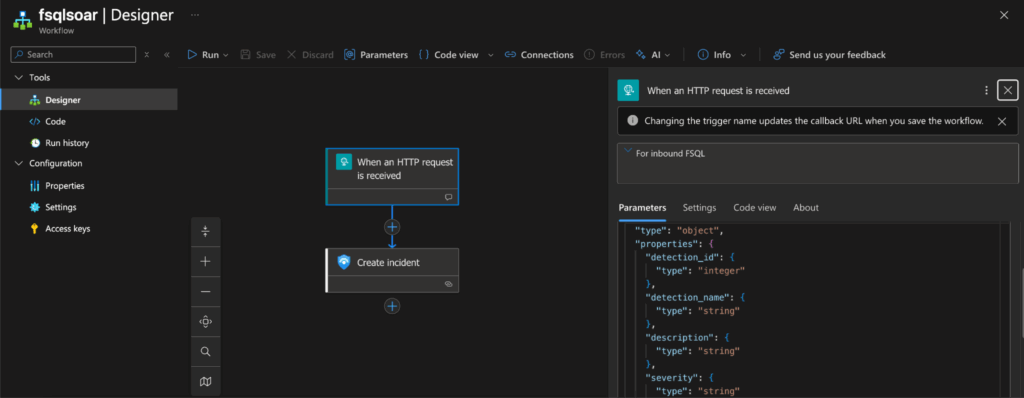
This pattern is more or less what I personally use, as the Security Data Mesh allows you to treat your data as a product due to our federated governance of enforcing both search criteria and results being expressed as OCSF. Instead of remembering what field or column name corresponds to an IP or service account in an ALA or ADX table, or in a Splunk index, I express search intent against types of findings and signals (Event Classes) or using specific objects or attributes in OCSF.
The Query Engine will handle finding out which Connectors fulfill this search intent, translate the queries as appropriate, and bring back the data I care about. This is an important paradigm because you can write Detections in a broader fashion while remaining aligned to specific IOCs, IOAs, or behaviors you wish to interdict. This likewise goes for enrichment use cases, instead of having to manually run through data from ServiceNow CMDB, Okta, Entra ID, 1Password, Push Security, and AWS CloudTrail – one FSQL query will gather all of that data for a specific user at once.
This reality simplifies information gathering and tightens up the intelligence cycle for your analysts, allowing them to quickly exit the Direction and Collection phases and concentrate on Analysis and Dissemination instead. These common runbooks can be turned from ten tabs in your browser, a Python script, 3 PowerShell commands, and a CSV into one or two FSQL queries. Speaking of runbooks, that is foreshadowing the next use case.
Federated Exploratory Data Exploration in Sentinel Notebooks
Another powerful component within the Microsoft Sentinel ecosystem is the Notebook. In Microsoft’s own words:
“Jupyter notebooks allow you to supercharge your threat hunting and investigation by enabling documents that contain live code, visualizations, and narrative text. These documents can be codified and served for specialized visualizations, an investigation guide, and sophisticated threat hunting.”
Notebooks were always intended to extend Sentinel’s capabilities — to let Security Operations (SecOps) teams perform deeper, code-driven investigations. For teams with Python expertise, they offered a glimpse of what Query does natively: federating queries and ad-hoc searches into remote data stores without needing to move data or reindex it.
With Query, that process becomes even simpler. Each Notebook can be aligned directly to a SecOps playbook or runbook, such as an IR workflow, threat-hunting scenario, or data-gathering investigation.
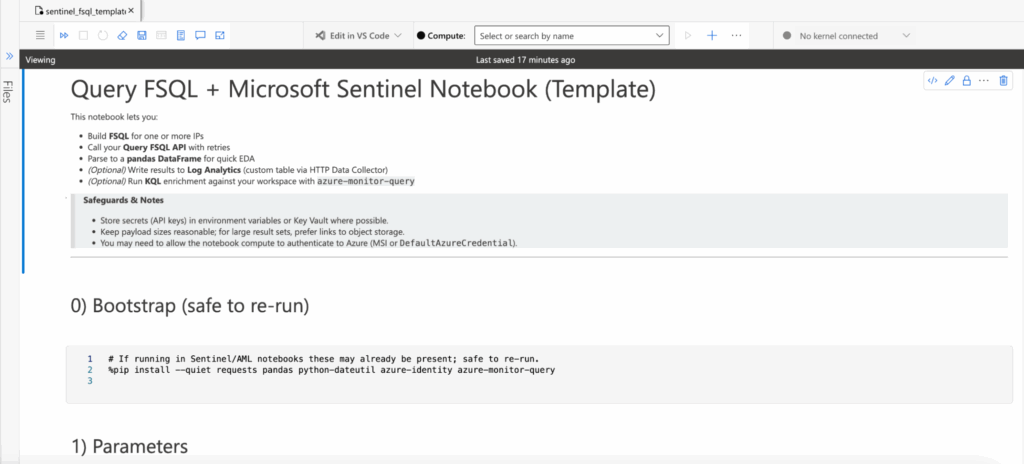
In a previous section, I described a real-world incident investigation where an analyst needed to pivot across multiple systems to understand a compromised identity. This wasn’t hypothetical; it reflects an actual Query user’s challenge. Their environment included two identity providers, 1Password, Push Security, and telemetry from EDR, DLP, Email Security, CASB, and app logs stored in a data warehouse. Traditionally, getting the “full picture” of an identity meant juggling tabs, scripts, and inconsistent data sources.
With Sentinel and Query, that same workflow looks like this:
- Analytics Rule triggers on the
AzureActivitytable (analogous to AWS CloudTrail), detecting multiple failed logins in a given period. - Incident automatically created and assigned to a SecOps Analyst.
- Analyst runs the Compromised Identity Runbook in Sentinel Notebooks.
- The Notebook executes pre-built FSQL searches, generates visualizations, and optionally exports results to CSV or Log Analytics.
- Profit from time saved, data fidelity, and reduced analyst frustration.
The Query Security Data Mesh treats decentralized and distributed data as a product. That means SecOps teams don’t have to worry about pipeline brittleness, inconsistent governance, schema drift, credential rotation, or pagination logic. Within a single KQL search (and one or two FSQL searches) an analyst can see everything they need, directly from the data’s native systems.
-- Gather user context
QUERY user_inventory.**
  WITH %username == 'barbara' OR %account_name ICONTAINS 'barbara' OR %email ICONTAINS 'barbara'

-- Gather account change and DLP events for the user
QUERY (data_security_finding + account_change).**
  WITH %username == 'barbara' OR %account_name ICONTAINS 'barbara' OR %email ICONTAINS 'barbara'
From there, analysts can trim or expand fields to suit the scenario, but every step runs within the Query Security Data Mesh, right inside the AzureML environment linked to your Sentinel workspace. No pipelines to rebuild, no data copies to manage, just federated insight on demand. Finally, if you are still not convinced, we’re cooking on something I mentioned earlier that uses our Agent ecosystem to bridge the gap between KQL and FSQL.
Coming Soon: the KQL Translation Agent for FSQL
Not every customer comes to us fully “greenfield” as a new Sentinel customer from Splunk, typically there is almost always other data sources and the SIEM migration is in progress, heck – that’s why they’re a Query customer! In certain cases, the Sentinel users are already mature because Sentinel may be the incumbent SIEM to begin with. This last use case is for you Sentinel Super Saiyans out there who really like Sentinel, and all it offers, but may not like the costs or data ingestion complexities anymore than Splunk users.
Query has been steadily developing our AI capabilities, it’s in the name after all, but we only release these capabilities as smaller architectural quantums that align with security jobs to be done. Where other “AI SOC” tools gladly turn your money into tokens and throw 100s of MBs (if not more) of context data at the LLM and hope it can meaningfully summarize and interdict cyber threats, we took a different approach. We have discrete sets of capabilities as CoPilots and as Agents in our ecosystem.
One of our more exciting agents is the FSQL Generation Agent, which allows you to express search intent and use cases in natural language and the Agent handles searching your onboarded Connectors and the OCSF schema in its entirety to closely match what you want in a FSQL query. From there, customers will plug that FSQL into Federated Detections, external SOAR and automation platforms like Torq or Tines, or even run them from a Sentinel Notebook. Where this Agent didn’t do well in the past was translating query logic from other languages into FSQL, such as KQL or Sigma.
The team is hard at work on building Retrieval Augmented Generation (RAG) workflows and vectorizing core concepts and documentation of KQL, SPL, SQL, and Sigma into discrete Agentic workflows. You will be able to take your custom Analytics Rules out of Sentinel and provide the KQL into the Agent and receive back working FSQL. Taking this further, you could use an A2A capable Logic App Workflow to communicate with the Agent over A2A, letting Microsoft’s AI Agents use the Query Agents to ideate on follow up queries for more ad-hoc information gathering outside of Notebooks and Stateful Workflows.

The above screenshot is a working prototype of the Agent in our lower environment, and is subject to change once we release it for General Availability. In this example, you can see how it translates this hunting playbook into FSQL using our summary analytics functionality. We cannot wait to see how Sentinel and Microsoft Defender XDR customers use this!
Query-as-an-Extractor for Sentinel Codeless Connector Framework
The Codeless Connector Framework (CCF) in Microsoft Sentinel is an interesting piece of kit; it’s a way to create polling-based connectors that fetch data from APIs or cloud storage into Sentinel without writing code. Instead of deploying Azure Functions, using a commercial Security Data Pipeline Platform (SDPP), and/or maintaining ingestion VMs, you just define a configuration (endpoint, auth, pagination, and a Data Collection Rule) and Sentinel handles the plumbing.
At first glance, it sounds like it could replace what we do at Query; you could, in theory, recreate parts of a Security Data Pipeline using nothing but CCF. And that’s technically true. A well-constructed CCF can pull from REST APIs, call your FSQL endpoints, and drop the results into custom Log Analytics tables for immediate KQL searchability.
But that’s also where it stops making sense. CCF always indexes into Azure Log Analytics (ALA); you pay ingestion and retention on every byte that comes in. It’s not built for cost avoidance or just-in-time querying. It’s a scheduled ingestion pipeline, not a federated one. If you used CCF to mirror large datasets from Athena, Splunk, or ADX, you’d lose the efficiency and data sovereignty that make federation valuable in the first place.
That said, there are good reasons to use it. For small, curated datasets – static or slowly changing – it’s perfectly fine. Think enrichment tables, watchlists, or user risk rollups; things you want searchable all the time and don’t mind storing in Sentinel long-term. In those cases, it can actually complement Query nicely (for example, running an FSQL job that summarizes remote data and using CCF to ingest only that thin, aggregated result). That would pair nicely with our built-in Summary Analytics functionality within FSQL.
If you start using CCF as your federation layer, though, you’ll end up managing all the problems Query was built to solve (watermarks, deduplication, schema drift, auth rotation, pagination, and transformation). It’s better to let Query handle the federation and use CCF for what it does best: simple, low-volume, recurring ingestion where always-on KQL visibility outweighs the storage cost.
Of course, you can avoid CCF altogether and instead durably store the data cheaply in Azure Storage Account Blob Containers, using our Security Data Pipelines, and ingesting into ADX for creating materialized views as needed.
Conclusion
We’ve outlined five powerful ways to extend Microsoft Sentinel’s capabilities by integrating it with the Query Security Data Mesh. Whether you’re using Azure Logic Apps to manage incidents from FSQL detections, streamlining threat hunting with Federated Exploratory Data Exploration in Sentinel Notebooks, anticipating the power of the KQL Translation Agent, or finding the right balance with the Codeless Connector Framework, the core message remains the same: Federation is the key to unlocking the full potential of your security data, regardless of where it lives.
By leveraging Query, you can achieve true data sovereignty, drastically reduce log ingestion and retention costs, and empower your Security Operations Center (SOC) with unified, OCSF-normalized data insights on demand. The Query Security Data Mesh is the foundational shift in how SecOps teams manage, govern, and extract value from decentralized data.
Stop paying to move data you already own. Start getting answers instead.
Ready to see how the Query Security Data Mesh can transform your Sentinel environment and save you money? Our SecDataOps Savages are standing by to show you a demo! Reach out to the Query team today to schedule your personalized walkthrough and take the first step toward a cost-effective, high-fidelity security data strategy.
Stay Dangerous.
