


A backup service account logged in from a laptop that had no agent on it, and no alert fired. Identifying the laptop and then the person took five sources, including two live identity stores that are not reachable from the SIEM. Agents wired to each tool separately fail in multiple places. First, they don’t go deep enough to get all the details, and second, the data comes in different shapes. Yeeting raw JSON at a frontier model is fine at a few sources (even though it really isn’t), but really falls apart as sources grow. I posted some research on that last month if you want to dig in here.
Security investigations are puzzles with the pieces in different rooms. Miss one and the picture does not go together. Most of the AI agents I see in security are wired to one room at a time, and they finish the puzzle with whatever pieces that room had. This one came together because the query went to every room at once, and eight days later the Worker went back to check whether anyone had acted on the follow-up actions.
09:22:50: the login no alert caught
That morning the backup service account had authenticated at 08:00, 08:15, 08:30 and 08:45 from the same server, the way it did every day. At 09:22:50 it logged in from Chrome on a laptop, and no alert fired.
| source | time | account | source address | user agent |
|---|---|---|---|---|
| Okta sign-in log | 08:00, 08:15, 08:30, 08:45 | svc-backup@ | 10.100.10.5 | ServiceAgent/1.0 |
| Okta sign-in log | 09:22:50 | svc-backup@ | 172.16.82.127 | Chrome/120.0.0.0 |
Figure 1. The five records from that morning. A scheduled identity sweep found the fifth one; nothing in the estate had alerted on it.
Five sources, five names for one laptop
Five sources knew that laptop, and each called it something different. Every analyst I have asked can describe that pivot in a sentence, and I have watched it take an hour. Each system holds one piece and names the address its own way, which is the ordinary condition of security data and the reason a person doing this pivot opens five consoles.
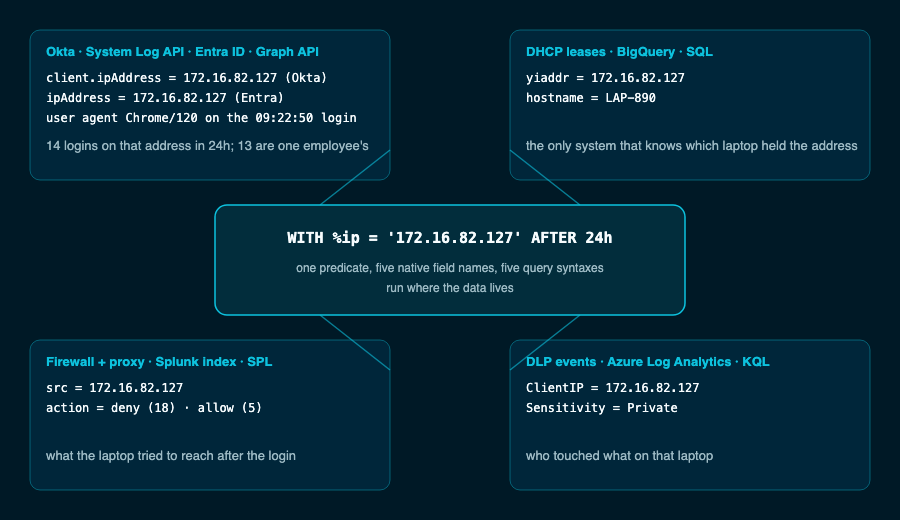
Figure 2. Okta and Entra ID over their APIs, DHCP leases in BigQuery, the firewall and proxy in the Splunk index the team already pays for, DLP in Log Analytics. Five sources, five names for one address:
One predicate, WITH %ip = ‘172.16.82.127’ AFTER 24h, was expanded by the planner to every field any connector had declared as an IP address and handed it to each source in its own syntax, an Okta client.ipAddress filter, a Graph $filter, a SQL, SPL and KQL where clause, so DHCP answered with the laptop’s name because its lease table declared one, and nobody had to know to ask it. A second query on the identity log for that address returned 14 logins in 24 hours, 13 of them one employee’s, and the service account’s login sat between her 06:40 and 13:37 logins.

Figure 3. What the query planner does
It reported what was missing
Two of the eight identity attack patterns in that sweep came back as data gaps rather than clean, because the MFA fields were empty on both identity sources and the activity log had no role changes to show. No rows and no field are different findings, and it reported the second as a gap, with the source to add, in the same list as the credential rotation.
| field | Okta | Entra ID |
|---|---|---|
| src_endpoint.ip | populated | absent |
| device.ip | populated | populated |
| actor.user.email_addr | populated | populated |
| user.email_addr | empty | not reported |
| has_mfa, auth_factors | empty | empty |
Figure 4. The Worker’s own field map from the run. It probed each connector’s fields before the sweep, which is how “empty” and “absent” get reported instead of “clean.”
The path matters: more sources, worse answer
That run is one estate. I ran a study this summer because, months earlier, a mock firewall had returned zero rows to my agent over a timestamp format, and the agent reported “no firewall activity for this entity” with full confidence.
tool: firewall.search filter: dst_ip=10.4.2.17 time: 2026-07-14T09:00:00Z..
rows: 0 error: none warning: none
agent: “No firewall activity was found for this entity in the window.”
Figure 5. The shape of the failure, reconstructed. Raw per-source tools scored 50 percent on that task at every scale; the normalized layer scored 100, because it puts time into a common form before the query leaves. The mock returns empty rather than a type error, so read this as the failure class, not a measured production event.
With the same agent, model and questions, completeness through each source’s own tools fell from 78 percent at 5 sources to 53 at 40, and the agent reported done with the same confidence both times. On the broadest question in the set, the one that asks the agent to look everywhere, the raw arm fell from 75 percent to 20 while the same agent through one normalized layer climbed from 67 to 83.
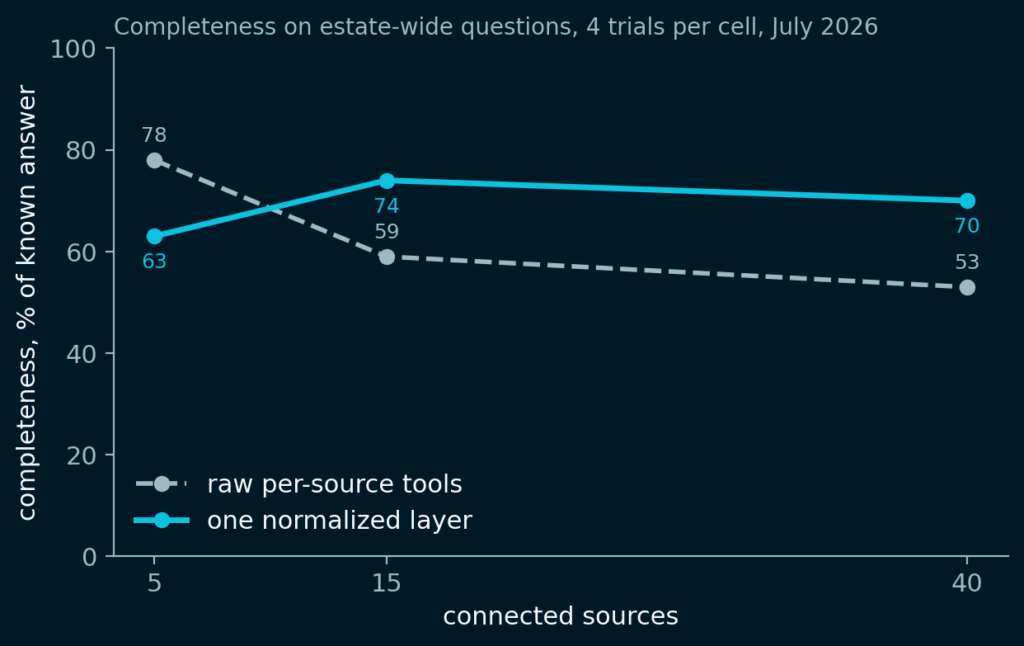
Figure 6. The raw arm’s completeness drops between 5 and 15 sources and keeps sliding; the layer holds. The advantage swung 32 points across the range, and a real estate sits past the right edge of this chart: our median customer connects about 60 sources. Four trials per cell.
The obvious explanation is budget, so I checked. From 5 to 40 sources the raw agent doubled its queries and went from 21.6 cents to 48.7 cents per investigation for a little over half the answer, and it still skipped a quarter of the relevant sources, with two of every three it did open getting one query and no follow-up. Colleagues asked whether instructions would close the gap, so I appended the same three-sentence instruction to both arms, run a discovery pass and check every source that could change the answer. At 40 sources that lifted the raw arm from 20 to 33 percent on the broadest question, and it stopped after about seven queries against forty sources, nowhere near its turn limit.
Figure 7. It ran out of attention. On the same harness the normalized layer never consulted less than 95 percent of the relevant sources, used fewer queries to get there, and by 40 sources cost 33 cents per investigation while returning more of the answer.
Figure 8. Prompting moves the number at 5 sources. At 40 it moved it 13 points, and the agent still stopped at seven queries.
An index cannot reach Okta’s API
Splunk’s federated search now reaches S3, Azure storage, Databricks, Snowflake and Security Lake, all of it storage and warehouses, and Vega moves an inverted index into your own bucket, which changes where the index lives. It does not change what it reaches, and neither documents reach into an identity provider’s API, which is where the pivot above started; Jeremy Fisher has the mechanics in Where the index lives and the study is in my August post.
| Source in the pivot above | Splunk federated search | Vega |
|---|---|---|
| Okta, over its API | no federated reach; ingest via add-on only | not published |
| Entra ID, over its API | no federated reach; ingest via add-on only | not published |
| DHCP leases in BigQuery | not documented (S3, Azure storage, Databricks, Snowflake, Security Lake are) | not published (object storage is) |
| firewall and proxy in a Splunk index | yes, Splunk-to-Splunk | delegated to the SIEM |
| DLP events in Log Analytics | not documented (Azure Blob and ADLS are) | not published |
Figure 9. Reach against the five sources this pivot needed, from each vendor’s public documentation as of August 2026. Ingesting a source through an add-on is not federated reach. Jeremy’s post has the page-level citations.
Day 8: the Worker checked its own list
Eight days later the Worker re-ran the sweep, checked its own six recommendations as a remediation table, and found all six still open. The service account was now logging in from the laptop seven days running and browsing the web after login, a DLP event on the same laptop had flagged a Private-classified file, and a firewall log connected in between showed 18 policy denies from that address, so the Worker escalated.
| Day 1 | Day 8 | |
|---|---|---|
| Chrome logins from LAP-890 | 1 | 7 consecutive days |
| post-login web activity | none seen | 3 http_activity events, 09:25 to 09:35 |
| DLP on that laptop | none seen | Private-classified file flagged |
| firewall | policy log not yet connected | connected in between: 18 policy denies, 5 allows |
| recommendations closed | 6 issued | 0 of 6 |
| disposition | suspicious, high confidence | escalated |
Figure 10. The same queries, eight days apart. One new row came from a source connected in between; the rest came from sources that had been quiet on day 1.
Reach is the job
Naming the laptop and then the person took 49 queries against five sources that share no query language, and nothing was ingested to do it. Underneath the ingest-or-federate argument is a plainer problem, reach, and I have watched it hold investigations back for decades. Access to distributed data when you need it is a core capability of a modern SOC, whether a person, an agent, or whatever comes next is at the keyboard. And right now, I like my AI to be helpful. Noticing that nobody acted on the last report is worth a lot more than telling me “that insight changes everything.”
