


Introduction
Security teams running large Microsoft-centric environments depend heavily on telemetry from Defender for Endpoint (MDE), Defender for Office 365, and other Defender products (for Cloud Apps, Identity, IOT, Servers, Vulnerability Management). These customers often collect logs in Azure Log Analytics (ALA) directly or via Microsoft Sentinel, and use Azure Data Explorer (ADX) for low-cost long-term retention and analytics. Analysts also lookup identity and managed device information from Microsoft Entra ID (formerly Azure AD) and Microsoft Intune in their investigation process.
Many of the same organizations have historically used Splunk as their primary SIEM but when indexing telemetry from the sources above into Splunk, they quickly encounter high ingestion costs, forcing difficult tradeoffs on retention and visibility. The prevalence of enterprise licenses like Microsoft 365 E5 has led to those organizations retaining data in various Microsoft-managed platforms, be it ALA, ADX, Sentinel, or Defender XDR. So now we are in a world where SOCs have a split & disconnected environment with analysts forced to manually correlate data, jumping from Splunk to Microsoft tools.
In this blog, we go through how a customer solved the problem using the Query security data mesh. Query enabled the customer to investigate Microsoft sources from Splunk without needing to move data into Splunk indexes. The result: extended visibility, reduced costs, and preservation of familiar analyst workflows.
Customer Environment and Use Cases
This organization has grown over the years and is using a broad mix of on-prem, cloud, and SaaS solutions. In the last two years, they have been aggressively adopting Azure for their primary cloud infrastructure and have enterprise-custom licensing with Microsoft. Their toolset has heavily moved towards Microsoft, but with one major exception – Splunk.
The SOC prefers to continue to use Splunk as it has been their primary tool for a decade. From the CISO’s perspective, SIEM cost is an issue, irrespective of Splunk or Sentinel. Given the team’s expertise, their current workflows and tooling, for now he had decided to stay with Splunk but didn’t want to index the new Microsoft data sources in it.
Here is a summary of their environment and processes that are currently disconnected from Splunk:
- MDE is their most important source providing rich alerts and telemetry (process, network, registry, file, correlation events).
- Defender for Office 365 is detecting spam, phishing, and malware.
- ALA workspace tables have the long-term archive of the sources above.
- Sentinel connectors and Azure Monitor agents are also populating a wide variety of security, networking, and observability logs from their Azure environment into ALA.
- They have additional data in ADLS Gen2 that is onboarded into ADX on an as-needed basis for analytics use-cases.
- Kusto Query Language (KQL) is used to access ALA and ADX. SOC analysts don’t directly write KQL. That’s manually authored with assistance from their platform team having SQL expertise. The point of collaboration is their playbook repository where the KQL for their common scenarios is manually pasted in/out of.
- Analysts pivot from Splunk into the above consoles and/or run KQL.
Problems to solve:
The environment had become too complex with telemetry and context spread in multiple tools. As discussed earlier, all that data couldn’t be centralized into Splunk for cost and other business reasons. Analyst time is the most prized resource which was being used sub-optimally – they start their investigation in Splunk and manually piece through and complete their investigations, switching through consoles, SQL, and command line tools.
Abandoning Splunk in favor of Sentinel is not an option they want to take at this time. So, they wanted to explore if there is any technology that could help bridge Splunk with their Microsoft environment without indexing the above data in Splunk.
Secondary to the main need, the security team also had an ongoing agentic-AI research project, hosting an LLM in their private cloud and letting it access and train on their security data. They were looking for an API-gateway and MCP server, to make their distributed security data accessible.
The Solution: The Query Security Data Mesh
The CISO remembered hearing about Query as a SINET16 2024 award winner and asked his security architect to explore further. After reviewing Query’s website content and documentation, and seeing support for several of the Microsoft technologies they used – ALA, MDE, ADX, Entra ID, Intune, Defender for O365, and more, they requested a demo.
The Query Security Data Mesh lets users access, use, and get answers from security-relevant data, wherever it is stored. Query has a Splunk app (see here) that enables search, visualization and analytics from the Splunk console for customers that desire to keep Splunk as their primary interface. The app works without needing to index into Splunk, and data can stay in its native locations: data lakes, cloud storage, or any API-accessible place. Query supports over 50 data sources and regularly adds additional integrations as per customer needs.
Federated Search is the mechanism by which an operator can use a single, centralized tool to search in parallel across heterogeneous data sources. This way Query searches, for example, not just the live information held in MDE, but also the alert archive held in ALA and presents their combined results in a unified way. Both user input and search results get normalized and standardized into Open Cybersecurity Schema Framework (OCSF). The unified model makes it easy for analysts to analyze, aggregate, filter, and pivot.
Beyond the Splunk App, Query is available via a standalone UI, APIs, a SQL-like query language called FSQL, and via MCP Server (for consumption by AI agents).
Upon understanding Query, the CISO and the security architect were excited by the potential and decided to do a quick POC off of a sandboxed lab environment.
POC Setup with Query
The lab sandbox environment had data sources reflective of the customer’s production environment. Let’s start with how some of the data sources were connected to be available via the mesh:

Connection Setup, Data Discovery, and OCSF Normalization
Unlike a SIEM connector, the Query Connector does not ingest data. It translates the analyst’s search intent/term(s) expressed via OCSF into an efficient native query such as KQL, and then executes that via API call into the relevant platform. It normalizes results into OCSF so that they can be collated with results from other Query Connectors running in parallel. The mappings needed for the normalization are typically either (a) built-in the connector based upon the source device – called a static schema connector in this case, or (b) defined at connection-setup time with help of Query Copilot that introspects a small sample of data and recommends mappings. The latter is called a dynamic schema connector and is used when the data schema varies from environment to environment, as seen for example, with data lakes and cloud storage.
Below is a summary of the relevant, one-time setup process performed by the admin:
Azure Log Analytics (ALA) Connector
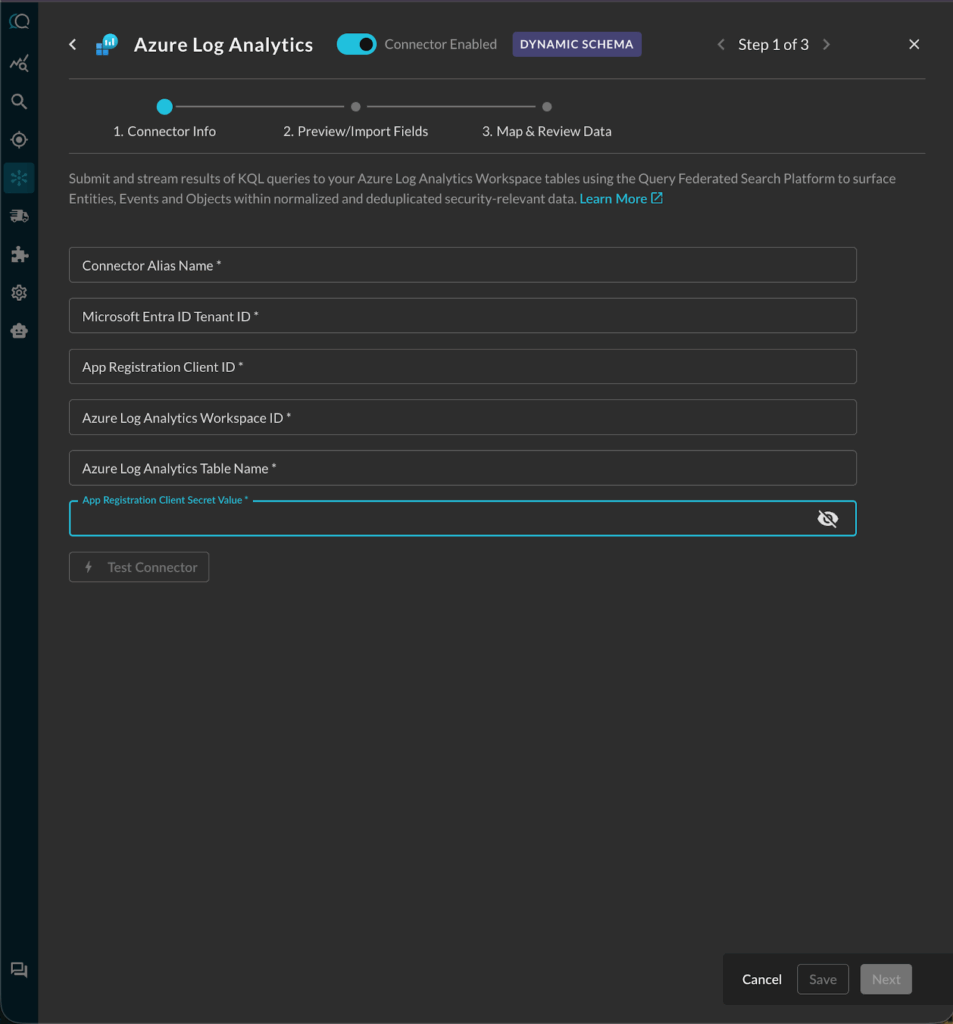
Azure Log Analytics, which is also the underlying store for Microsoft Sentinel, is a columnar, NoSQL-like database. Each ALA workspace contains multiple tables that are mapped to the OCSF data model in the Query Connector, with help of the Query Copilot. The Query connector transparently uses KQL to query them in parallel. The customer’s admin followed the documentation here to set up the connector providing these connection settings:
- Azure Log Analytics Workspace ID
- Azure Log Analytics Table Name
- Microsoft Entra ID Tenant ID
- App Registration Client ID
- App Registration Client Secret Value
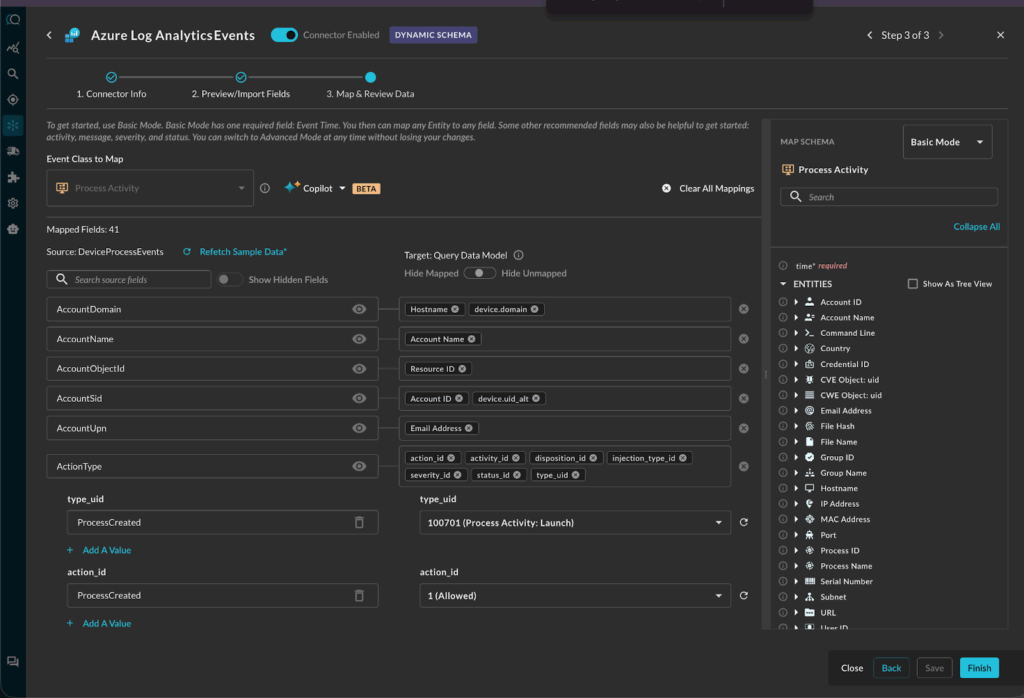
Next, the customer used Query Copilot to automatically map the various Kusto table schemas into OCSF categories, including:
- Detection Finding
- Process Activity
- Network Activity
The mappings were automatically generated, then reviewed and approved by the customer’s admin.
Here is an example of the Process Activity mapping:
Azure Data Explorer (ADX) Connector
The customer was using ADX for long-term low-cost retention. ADX also enables customers to onboard datasets natively from object storage (such as Azure Blob Storage and ADLSv2). The Query connector queries it transparently using KQL. The customer admin followed the setup steps documented here.
Microsoft Graph Security API Connector
The Microsoft Graph Security API within the Microsoft Graph API, allows users to retrieve Alert data for every single Defender SKU in their M365 and Azure environments. Whether you are using MDE, Defender for O365, Defender for IOT, etc., all of the Alert data is accessible via the Microsoft Graph Security API. The Graph API has several endpoints that are used by the Query Connector to consume users, devices, email, and security alerts. The customer admin followed the setup steps documented here.
Microsoft Intune Connector
Microsoft Intune is a cloud-based endpoint management service that helps organizations manage and protect their devices, apps, and data. It’s part of the Microsoft 365 suite and allows for both corporate and BYOD device management, ensuring data security and user productivity. The customer was using Intune as an important source of asset context and metadata, as it provided deeper information than what may be available from MDE or Entra ID. The customer admin followed the setup steps documented here.
Microsoft Defender for Endpoint (MDE) Connector
Microsoft Defender for Endpoint (MDE, formerly known as Defender ATP) is the EDR capability of the Microsoft Defender suite of security tools that is included with the Defender for Endpoint Plan 1, Plan 2, Vulnerability Management, and Defender XDR SKUs as well as M365 E3 and M365 E5 licenses. With Query Federated Search, you can search for any device as well as their related vulnerabilities and alerts. The customer admin followed the setup steps documented here.
Microsoft Entra ID (formerly Azure AD) Connector
Microsoft Entra ID (formerly Azure Active Directory) is a cloud-based identity and access management service provided by Microsoft, offering secure authentication and authorization capabilities for applications and resources in the Azure and M365 ecosystems. Using the Entra ID Graph API, security analysts can easily surface details relevant to several security and ITOps jobs, audit, and GRC tasks. The customer’s SOC was retrieving user information from their directory to see login details, their devices, audit logs, licenses, business-specific information, and more. The customer admin followed the setup steps documented here.
Enabling the Query Splunk App
The Query Splunk App (published on Splunkbase) enables search, visualization and analytics from the Splunk console without needing to index into Splunk. The Splunk admin connected the app to their Query tenant using an API token, following the documentation here. After that, the customer could run searches, detections and other analytics directly from Splunk into the connected data sources above.
The entire onboarding was completed in one hour because the customer admin was prepared with the required access, and most importantly, the setup doesn’t require moving big data.
Next, SOC analysts took over for a week of real use-case validation.
Validating Use Cases from the Splunk Console
Based upon their use-cases, analysts ran live investigations from the Splunk console across all the sources above. Some examples are listed below:
Analysts validated searching by common entity types
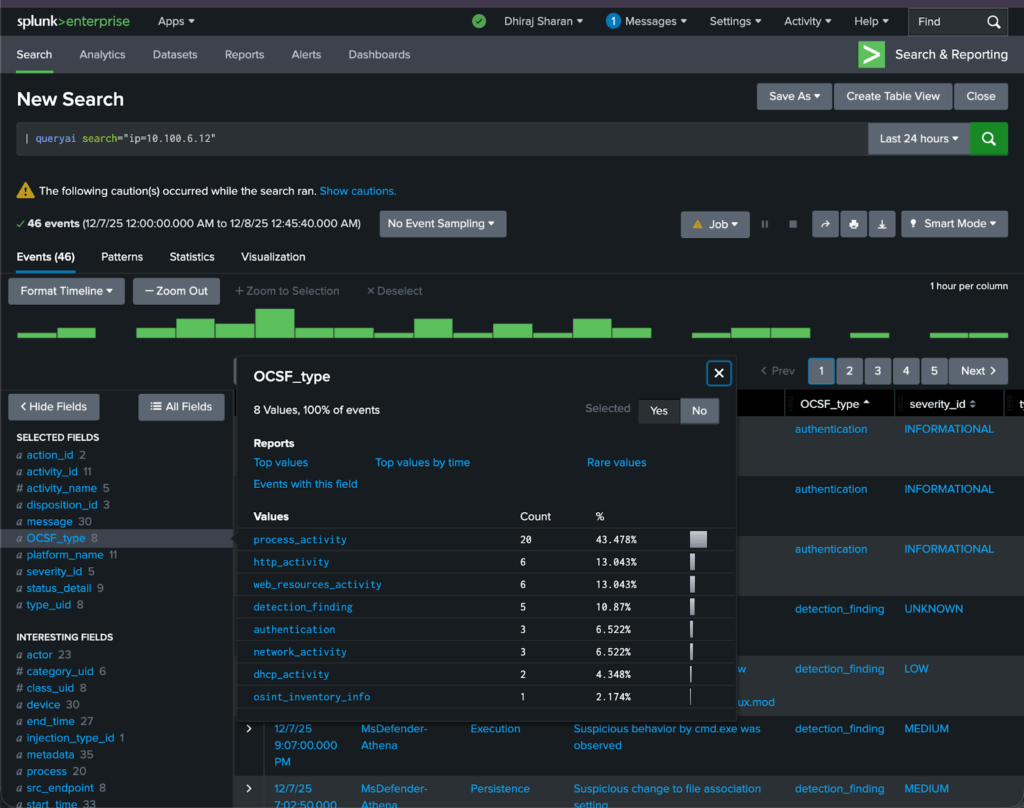
Analysts validated that they can do focused searches from the Splunk console for entities and specific activity tied to those entities. This includes searching by common cybersecurity entity data types like ip, hostname, username, email, file_hash, resource_id, and more. For example, here is how one analyst searched for a particular IP in parallel across all the sources above:
| queryai search="ip=x.x.x.x"
The search was executed in parallel across all six connectors configured earlier and across all the mapped IP data type fields in those sources. It would bring back, for example, Device Inventory Info for MDE machines and their related Detection and Vulnerability Findings by the public or private IP address. That is mapped to device.ip in OCSF and is pulled from the Microsoft Security machines’ API fields of lastIpAddress and lastExternalIpAddress.
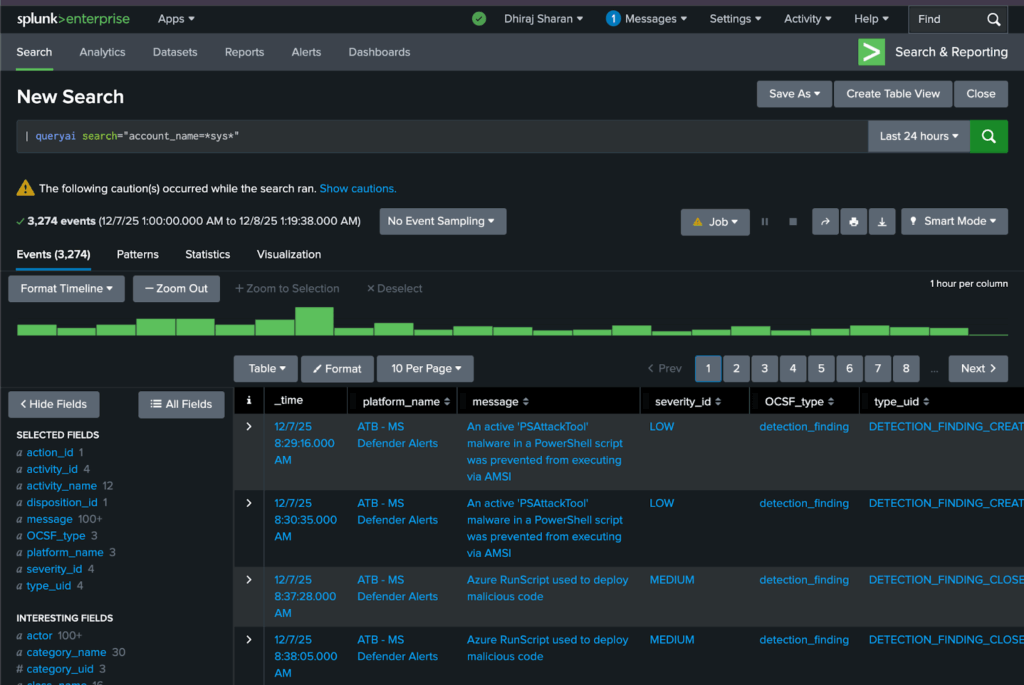
Another typical search scenario is by account name:
| queryai search="account_name=*sys*"
Analysts validated searching by event classes and their attributes
| queryai search="detection_finding=*" connectors="ATB - MS Defender Alerts, ATB - MDE" | spath input=finding_info
Here, they searched specific named connectors – MDE and MS Graph Security API – for all OCSF Detection Finding events, i.e. Alerts. Also note that the search results can be processed further via standard SPL. For example, the ... | spath input=... command above, extracts fields from the input object (finding_info) json’s sub-fields.
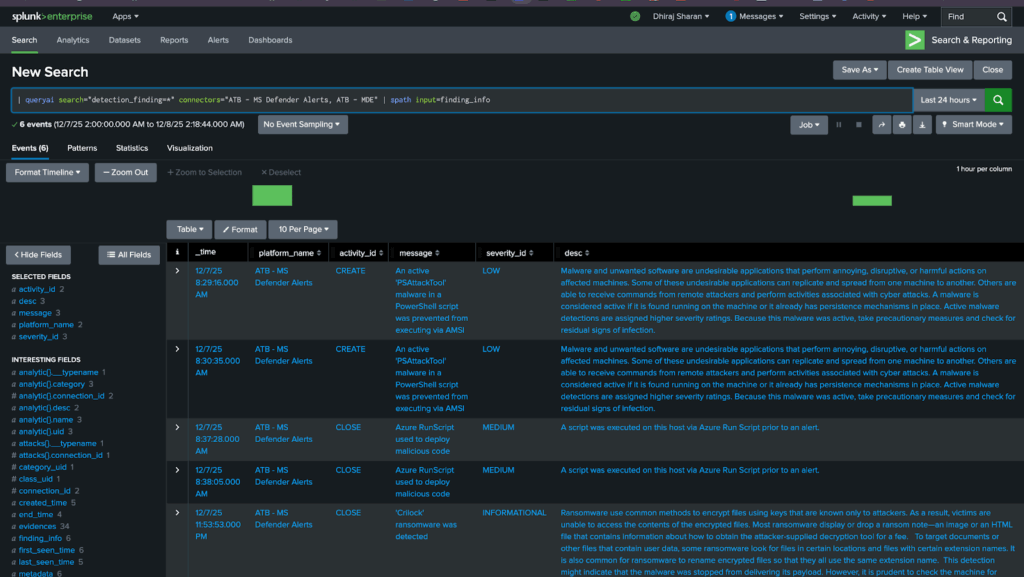
Analysts performed threat hunts. Example – Powershell executions on alerted device
Here’s a search the team ran to investigate process execution events detected by MDE where the command line contained PowerShell:
| queryai search="process_activity.device.hostname=xxx AND process_activity.process.name=powershell.exe" | spath input=process | spath input=device

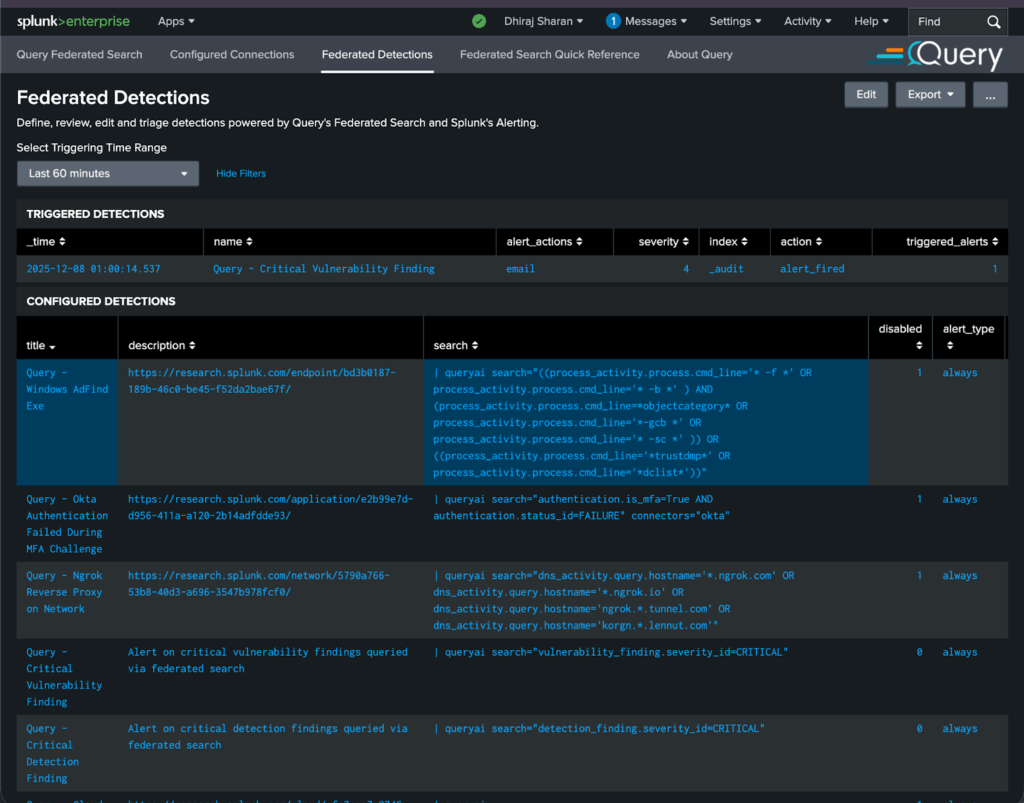
Detection Engineers could run “Federated Detections” without indexing in Splunk
Their detection engineers validated how they can leverage their existing detections and/or detections written by external providers like Splunk’s Threat Research team (see https://research.splunk.com/detections/). Query helped the customer easily modify the detection logic from CIM to OCSF. For example, this particular detection Detection: Windows AdFind Exe | Splunk Security Content looks for threat actors like Wizard Spider and FIN6 gathering sensitive AD information. The original detection logic was adjusted as follows:
| queryai search="((process_activity.process.cmd_line='* -f *' OR process_activity.process.cmd_line='* -b *' ) AND (process_activity.process.cmd_line=*objectcategory* OR process_activity.process.cmd_line='*-gcb *' OR process_activity.process.cmd_line='* -sc *' )) OR ((process_activity.process.cmd_line='*trustdmp*' OR process_activity.process.cmd_line='*dclist*'))"
The key difference is that federated detections are running on decentralized data stored in the Microsoft sources configured earlier in this document, and without any ingestion into Splunk.
Here is how analysts manage Federated Detections via the Query Splunk App – see the first row for the detection described above:
The SOC could power Splunk Dashboards with the Query Security Data Mesh
The team used some of the dashboards provided by Query and also migrated some of their existing dashboards to be powered by Query. Here is a Phishing Workbench example that uses the Defender for Office 365 data to investigate whether phishing emails were blocked, delivered, or quarantined:
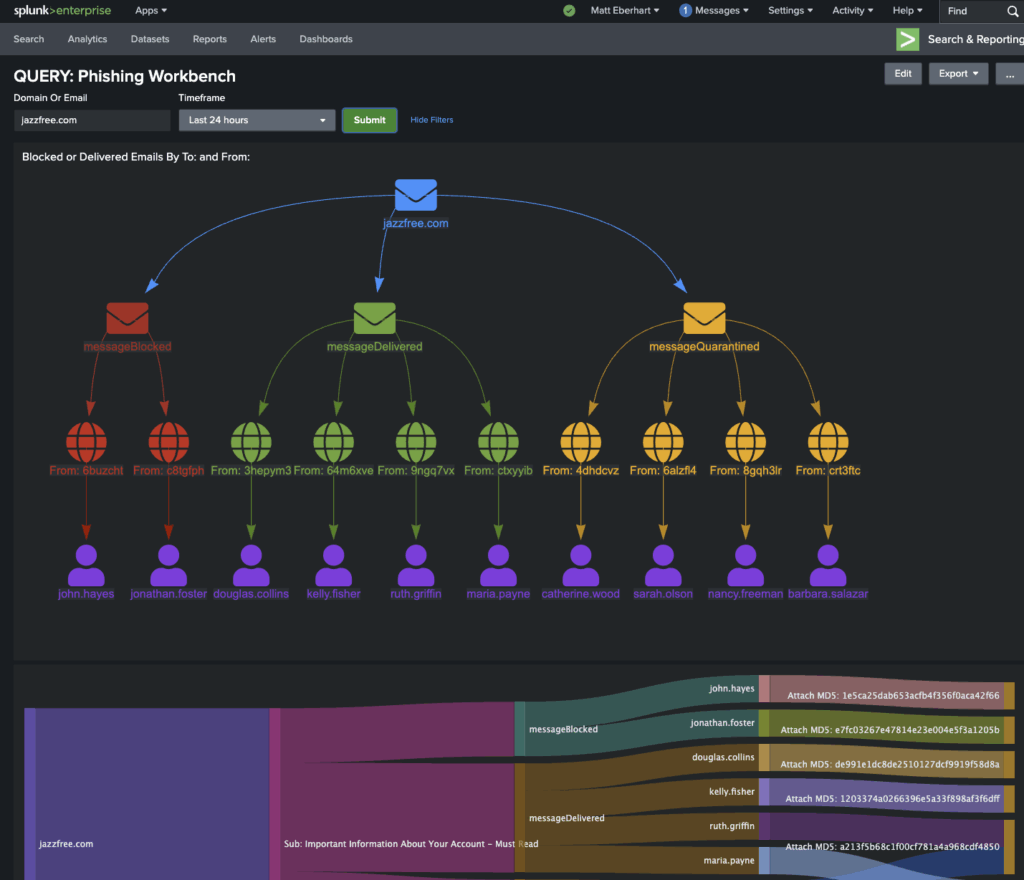
After multiple validations, the SOC confirmed that Query met their primary requirement: live investigation of Azure sources from Splunk, with no data ingestion.Now they are working on validating the secondary MCP Server use-case discussed earlier in this document. Watch out for a future article on that. Also see the AI Agents on Query website and this blog What The Model Context Protocol (MCP) Means for Federated Security.
Query POC Results Summary
The customer conveyed that the Query security data mesh POC was a clear success. They achieved:
- Empowered analysts with deeper visibility and ability to investigate using Splunk without ingesting data from a large number of Microsoft technologies.
- Parallel search across all sources.
- Continued use of analyst-friendly SPL (vs KQL or other native languages).
- Investigate both current “live” status and historical archive of the same source and/or entity.
- Minimal changes in the analyst workflows.
- Inputs and results normalized and unified.
- Run federated detections from Splunk without indexing into Splunk.
- Meaningfully lower SIEM / Splunk licensing costs.
Summary and Resources
In this customer success story, we showed how a large enterprise used Query to bridge the gap between Splunk and their Microsoft and Azure environment. The result: faster investigations, broader visibility, lower cost, and a modern architecture aligned with the customer’s long-term goals and AI initiatives.
If you’d like to explore the above approach further, please reach out to one of our security data operations experts.
Here are some additional references around Query and Microsoft integrations:
- Microsoft Security & Query Federated Search: Better Together
- Azure Log Analytics Integrated Into Query Federated Search
- Product Update: Query Federated Search integrated with Azure Data Explorer
- Extending the Query Security Data Mesh into Microsoft Sentinel
- Storing and Querying Cybersecurity Data from Azure Blob Storage
- AI Agents
- What The Model Context Protocol (MCP) Means for Federated Security
- Browse documentation for these Microsoft Query Connectors:
