


Introduction
As organizations continue to rely on endpoint detection and response (EDR) tools like CrowdStrike Falcon for deep visibility into endpoint activity, they quickly face the challenge of storing and analyzing the massive volumes of telemetry these tools generate. Many security teams depend on Splunk for investigation and detection, but the high cost of indexing large datasets often limits retention and visibility.
This customer success story highlights how one enterprise solved this challenge by archiving CrowdStrike Falcon data in Amazon S3 while retaining long-term visibility and workflows in Splunk through the Query Security Data Mesh.
Customer Environment and Use Case
This story involves a modern organization whose infrastructure is AWS-centric and the security team uses Splunk Cloud. Analysts are comfortable working within the Splunk console and SPL. The CISO has a mandate to extend endpoint-detection visibility to historical telemetry from CrowdStrike Falcon EDR, but the team is constrained by the Splunk licensing cost. Indexing additional high-volume EDR data into Splunk would lead to unacceptable cost escalations so they want to explore alternatives that could give them control and visibility over their data without a total Splunk rip and replace.
In short:
- The customer uses CrowdStrike Falcon for real-time EDR telemetry and detections.
- The organization has large volumes of endpoint telemetry (process, network, file events) which they want to keep for 6-months for retrospective investigations, threat hunting, and compliance—but their Falcon retention window is 15 days.
- The customer uses Splunk as their central SOC tool. Retraining analysts on an entirely new UI is not desired in the short term. Over the coming years, they wish to move off of Splunk but today is not the day.
- Current use case and business problem: Store six months of historical EDR telemetry in Amazon S3 buckets at low cost. Give security analysts access and tools to investigate and visualize via a Splunk integration, but without ingesting that data into Splunk.
- Future goal: Move off of Splunk over the next three years. Provide analysts with tools/interface to continue to investigate that data stored in S3.
Exploring Security Data Mesh Solutions
The customer’s architect was aware of emerging data mesh architecture patterns and landed on the Query website after reading a blog link in social media – CrowdStrike and Query Federated Search: Better Together. Upon understanding the Query Security Data Mesh, the architect contacted us for a demo of how we enable investigations from Splunk without needing to index data into Splunk. The security team decided to do a pilot project with Query Federated Search for Splunk to federate searches into the archived Crowdstrike data stored in Amazon S3.
The customer also discovered Splunk’s own Federated Search for Amazon S3 and decided to explore that option as well.
The customer shortlisted the two vendors for further scoping and testing.
Pilot Scope and Test Environment
For the initial pilot, the customer defined a functional scope and created a common test environment. They offloaded a subset of CrowdStrike endpoint events (file, process, module, network activity) into S3. They configured the S3 bucket with appropriate partitioning by date, region, and account with data in Iceberg format to enable Athena queries.
Next, the customer deployed an AWS IAM Role with External ID and permissions to use Amazon S3, Amazon Athena, and AWS Glue. Query (or any other vendor) was expected to use this IAM Role to connect to the data source.
NOTE: If you are looking for tools to pipeline data from CrowdStrike Falcon to S3 buckets, here are a couple of options you could try: Falcon Data Replicator (FDR), an open-source tool by CrowdStrike, or Security Data Pipelines, a part of the Query suite of solutions.
Testing Query
With the Query Security Data Mesh architecture, data stays in place (in S3 buckets for this customer) and does not move. Query supports parallel searching across 50+ of the security industry’s most common sources. New sources get added frequently based upon customer needs. Query Federated Search accesses remote data live on-demand, executes searches in parallel, and only sends search results to the client (Splunk Console or standalone Query Console). Query handles writing and optimizing SQL, query planning & efficient execution, merging and joining of cross-platform results, and their normalization and standardization. You tell Query what you want to find in your datasets and it handles the rest.
These are the steps the customer followed to test Query…
Setting up Query with Connection to Test Environment
STEP 1: Query Access
Query Customer Success sent an email invite to the designated customer admin to provision the organization’s Query tenant and invite other users to that tenant.
STEP 2: Amazon S3 Connection with Copilot driven schema mappings
- PART A: The customer admin followed Amazon Athena (for Amazon S3) guide to connect Query to S3 via Athena, using an IAM Role set up for read-only access. The connection parameters included the S3 bucket name, S3 bucket to be used for results, the database and table/view/materialized view names, and the AWS account ID and Region. The connection was fast and smooth – no data moves, only API access. At this point, the customer admin could see the raw data present in the S3 bucket. The next step was to normalize and map data.
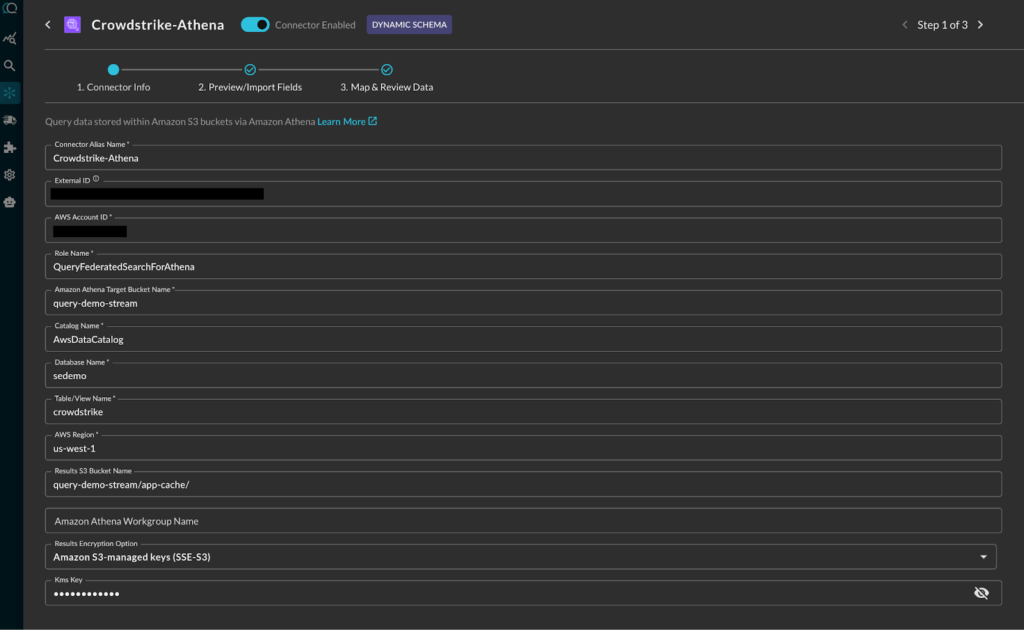
Adding Athena S3 Connection in Query
- PART B: The customer used the Query Copilot to automate the data normalization and schema mapping to the Open Cybersecurity Schema Framework (OCSF). The Query data model is based upon OCSF. (To learn more about OCSF, please read Query Absolute Beginner’s Guide to OCSF.) Though the copilot automated the process, it still gave the customer admin the opportunity to review, customize if needed, and approve the mappings.
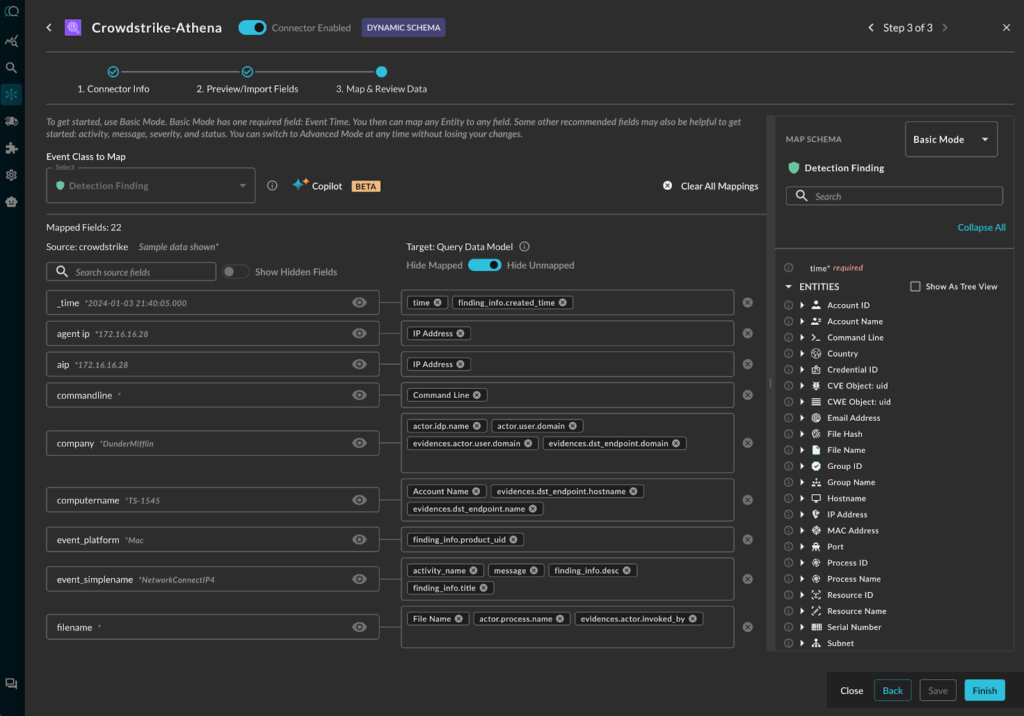
Query Copilot assisted mapping of CrowdStrike detections to OCSF Detection Finding
STEP 3: Enabling Query Splunk App
The Query Splunk App is a Splunk inspected and approved app available on Splunkbase. The customer’s Splunk admin, enabled the app following this guide.
The three steps were completed in a single, hour-long zoom call with Query Customer Success. Next, the admin turned over the environment to the analyst to test their use cases over a week.
UseCase Validation from Splunk Console
The first thing the customer validated is whether they can access the data via the Splunk Console. Here is the first Splunk search to look for Detection Findings leveraging the Athena S3 connector:
| queryai search="detection_finding=*" connectors="Crowdstrike-Athena" | spath input=actor | spath input=finding_info
Query functionality is available through SPL and can be pipelined with other standard SPL commands. For example, the … | spath input=… SPL command in the above search helps with extracting columns from the input object json’s sub-fields.
Here is how the tabular results of the query above look in the Splunk Console:

CrowdStrike data present in S3 bucket queried from Splunk (representative screen-shot from lab data)
After validating remote data access through the basic search above, analysts started to write the SPL for their specific investigative use cases. For example, one analyst wanted to see devices where the master password file had been opened. The search command for it:
| queryai search="detection_finding.actor.process.cmd_line=*master.passwd" connectors="Crowdstrike-Athena" | spath input=actor
See Detection Finding to understand its fields and see Running Federated Search from Splunk to understand the search syntax.
Results for the search above:
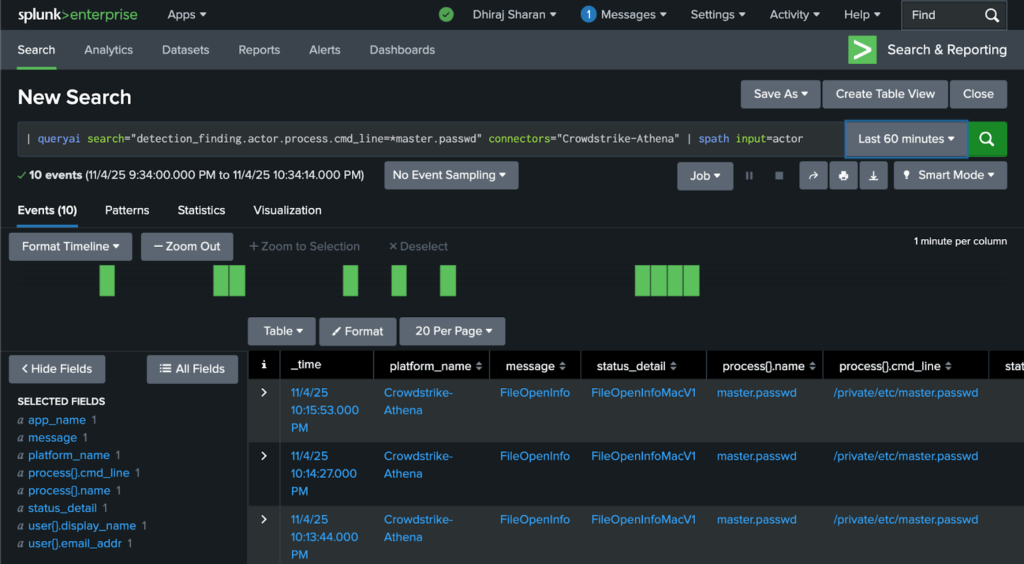
Searching for Detection Finding where CrowdStrike found the master.passwd file was accessed via command line (representative screen-shot from lab data)
The search was executed by Query’s data mesh into the S3 buckets and the search results were brought back and displayed in the standard Splunk console. The data bypassed the need to be inserted into a Splunk index. (Alternatively, based upon need, the customer could save focused results in a Splunk summary index with the … | collect … SPL command.)
With validations like the examples above, the customer called the pilot a success because it fulfilled their immediate needs discussed earlier (see the Customer Environment & Use Case section). They felt empowered to hook up their Splunk workflows and content, leveraging the | queryai command.
UseCase Validation from Standalone Query Console
Now that the immediate requirement to enable access from Splunk was validated, the customer wanted to validate how investigation workflows were enabled in the Query Console in the event they choose to migrate away from Splunk in the future.
As part of that validation, analysts used the standalone console from Query to test out the same use-cases.
Here is the Query results view of Crowdstrike data stored in an Amazon S3 bucket:
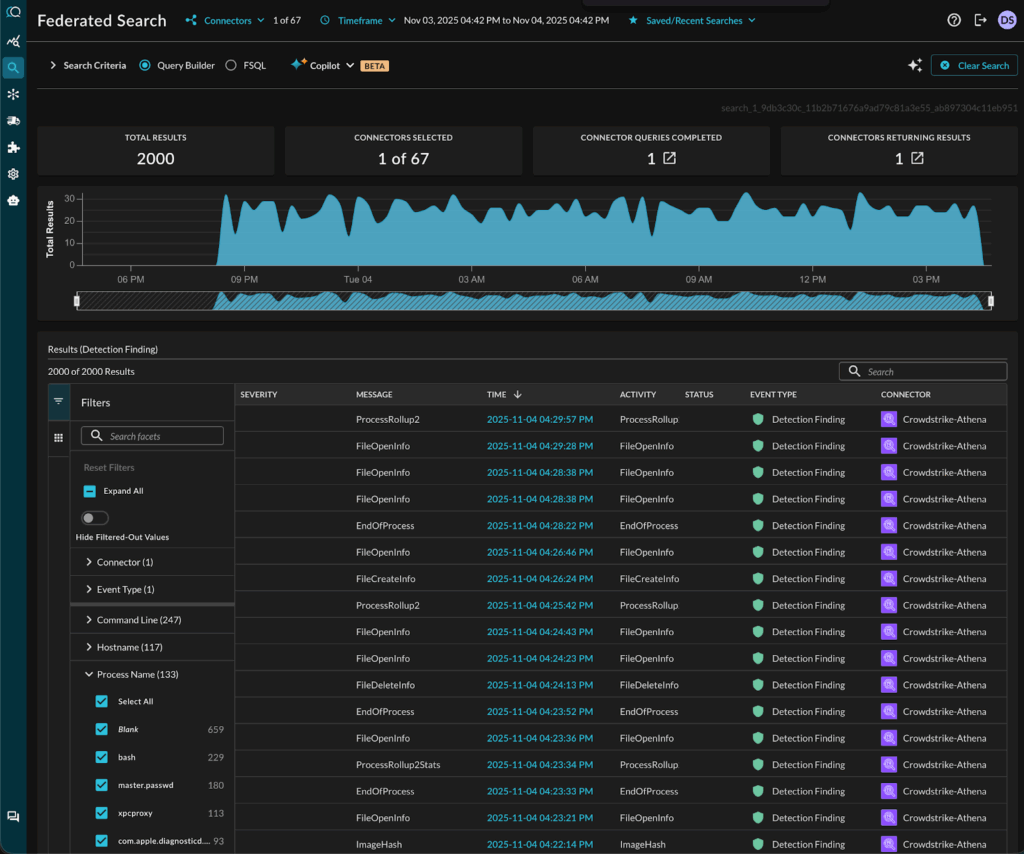
CrowdStrike data present in S3 bucket accessed from the standalone Query Console
They further tested the standalone Query UI that provided them an easy, form-based query builder to run their searches. Here is what the same search for master.passwd file access looks like:
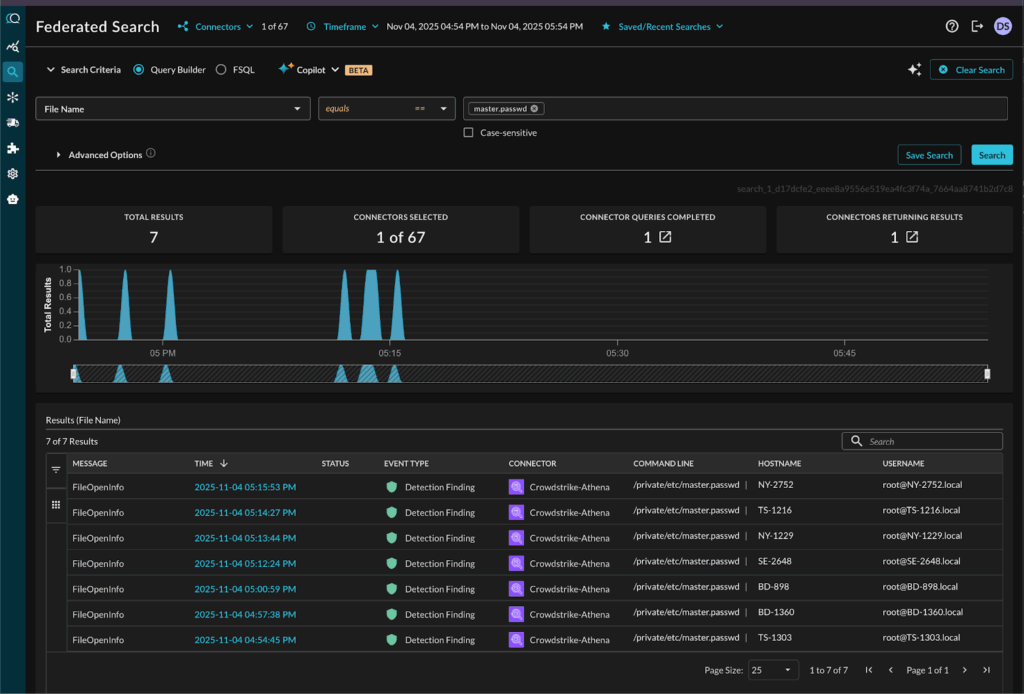
Searching for Detection Findings where CrowdStrike found the master.passwd file accessed via command line
The customer found a bonus feature very useful – the Query Copilot that helped analysts understand the details of their search results. This is how the Copilot helped analysts understand the risk of credential dumping attempts in the password file access scenario:

Query Copilot helps understand the data details and helps follow up
The experience using Query met and exceeded the customer’s validation of the scoped pilot project.
Testing Splunk’s Federated Search
As we discussed earlier, the customer had shortlisted two vendors for the pilot. The second vendor was Splunk with its own competing Federated Search solution (see Federated Search for Amazon S3 | Splunk Docs).
Splunk Federated Search ended up not fully solving the customer’s needs for the reasons below and hence they chose not to complete the pilot project with Splunk:
- The customer found that Splunk’s own federated search is designed to search across Splunk-indexed data residing in multiple Splunk instances and two additional sources – Amazon S3 and Amazon Security Lake. It doesn’t support the wide range of additional security infrastructure tools supported by Query.
- If the customer chose Splunk Federated Search, they still would have to pay for the base ingestion costs and then additional fees for the federated search capabilities. So net net, this was increasing their Splunk costs, instead of reducing it.
- Splunk Federated Search is not available as a standalone solution. This customer is considering a future project to migrate away from Splunk and did not want to increase their reliance on a single vendor.
A comparison with more detail on the differences between Query & Splunk Federated Search can be found here.
The Pilot with Query met and exceeded the success criteria. Plans ahead…
The customer deemed the Query pilot a success as they achieved their key goals and more. Here is where they stand today and plan to go next:
- Analysts don’t have to pivot out of the Splunk Console to manually run Amazon Athena queries and download logs. Investigations that used to require spinning up ad-hoc tools now transparently operate inside Splunk with familiar workflows.
- Analysts can run their playbooks from the Splunk console and continue to use SPL.
- The customer reduced Splunk/CrowdStrike related data costs by keeping endpoint telemetry in S3 buckets. They can apply lifecycle policies to migrate older archive partitions to Glacier and ensure cost remains optimized. They plan to have 1-year retention window, leveraging Glacier.
- The architecture allowed the SOC to scale visibility cost-effectively.
- The customer plans to add additional data sources into the mesh over time (network flow logs, cloud workload logs, identity logs, …), all retained in cost effective S3 buckets and searchable via Splunk.
- The data remains in raw form and available in S3 to other tools in an open manner. Normalization to the OCSF model is deferred until query-time rather than at ingest-time. This approach reduces upfront compute cost and preserves raw fidelity.
- The organization plans to enable custom detections using data stored in S3. They would reuse existing detection logic from Splunk Threat Research and adapt it to operate on the federated data.
NOTE: While this customer success story has been about storage in Amazon S3, Query also supports Amazon Security Lake as a data source. If you are using Security Lake, please refer to Query + Amazon Security Lake for relevant details.
Summary and Additional Resources
In this customer success story, we described how an organization used Splunk as its primary SOC console, had a need to use historical endpoint telemetry from CrowdStrike Falcon, but faced cost constraints on indexing large volumes of data into Splunk. By implementing a security data mesh architecture (using Query Federated Search) they offloaded archived EDR telemetry into Amazon S3, enabled federated search from the Splunk console, maintained analyst workflows, and avoided escalating Splunk licensing costs. The result: extended visibility, faster investigations, fewer blind-spots, and controlled costs.
Here are some additional resources and technical details relevant for the use cases above:
- Searching Historical Crowdstrike Data Stored in Amazon S3 Buckets
- CrowdStrike and Query Federated Search: Better Together
- Security Console for EDR Data stored in Amazon S3
- Measuring and Optimizing Enterprise Security Search Costs
For more information on this approach—offloading telemetry to S3, federated searching, and maintaining Splunk workflows—please reach out to one of our SecDataOps experts.
